Friday, June 12, 2009

Google Gives SEO Advice to the World

Google announced today that its SEO Starter Guide is now available in 40 languages. This covers 98% of the global Internet audience according to the company.

"We hope that webmasters around the world can use the guide to improve their sites' crawlability and indexing in search engines," says Brandon Falls of Google's Search Quality Team.

If you are unfamiliar with Google's SEO Starter Guide, it is a "compact guide" that lists best practices according to Google that both teams within the company and external webmasters can use to improve the indexing of their sites.

The guide was announced back in November, focusing on areas like improving title and description meta tags, URL structure, site navigation, content creation, anchor text, etc.

You can get the download link for any of those languages here. If you want to make sure your site is ranking as well as it should be in Google, it's probably not a bad idea to go over it and apply the advice to your site - particularly if you are new to the game.

Labels: ,


Monday, June 8, 2009

Microsoft Event & Free Giveaways

Hi guys! I have these amazing giveaways for you, sponsored by Microsoft. Before I go to the prizes, I would like to mention that Microsoft is having a web event called Make Web, Not War ‘09 in Toronto on Jun 10th (full day), and Vancouver on Jun 2nd (half day). Visit their site for details and registration. Write a comment about the event before Jun 12, in this post, for a chance to win: Microsoft Expression Studio, Gears of War 2 (Xbox game), or 250GB LaCie External Drive.

Prizes:

expression studio gears of war 2 250gb lacie drive

visit more details click here...

via : webdesignerwall

Labels: ,


Friday, September 26, 2008

Search Engine Optimization –Thoughts From a PPC Point Of View!

Search Engine Optimization – Random Thoughts From a PPC Professional Point Of View! If a person had asked me a few years ago whether SEO is complimentary to paid search or asked a SEO professional whether a person must even do PPC (Pay Per Click aka SEM aka Search Engine Marketing), I am sure both of us would not have given a positive opinion of the other.

One reason for this could have been that SEO is the grandfather of search and it is nearly as old as the search engines themselves, while PPC is only less than six years old. Many SEO professionals detested search engines for introducing paid search and firmly believed that it was a temporary phenomenon – if the SEO firms would have truly supported paid search from the beginning, specialist paid-search companies such as Communicate 2 would have found it difficult to prosper. In hindsight, I am truly grateful they didn’t and both of us got an opportunity to create our own niches.

The other reason could be that SEO and PPC is generally handled by two different departments of the marketer – PPC by the marketing department, SEO by the IT department. Thus, generally there is little collaboration between the two; both working in their own compartments, each thinking that it is the other’s job.

Today, however, I firmly believe that SEO is complementary to paid search rather than being competitive. In fact, PPC and SEO companies can work together to compliment each other’s services quite effectively. (the ‘Andar Ki Baat’ reason also is that now Communicate 2 has become a part of Isobar that owns one of the best SEO companies in the world, I-prospect and our agreement compels me to say positive things about SEO *Smile*)

Below are many ways in which SEO and PPC can collaborate and create a synergistic strategy that will result in most effective results for the client. Furthermore, there are some areas when either SEO or PPC is more effective, best thing to do is evaluate the purpose, then either use one of them or both of them in a way that they complement each other.

Identifying Keywords through PPC: When one designs an SEO strategy, it would be good to know which keywords drive most traffic, give most conversions, which are most expensive, and so on. I am sure that an SEO professional will understand this – paid search can give all this information at a flick of a button. If a person uses this information to design an SEO strategy, the SEO strategy would be very effective. Example, keywords that are expensive and give good traffic plus conversion must be given priority treatment by an SEO company. Cheaper keywords that although give good traffic and conversions could be given second priority.

Identifying conversion keywords through SEO: We have seen keywords that are on the 25th position on SEO and still give conversions to the client. A simple step of increasing the bid for those keywords, and getting them on position one for PPC has resulted in increasing conversions exponentially. We have many clients whose entire analytics is handled by Communicate 2; getting a higher listing for these long-tail keywords through SEO would not be difficult, but it would have also taken a lot of time. However, increasing bids on the PPC campaigns allowed us to increase the conversions almost immediately.

Identifying expensive conversion oriented keywords through PPC: Similarly, there are many keywords that are expensive keywords in PPC, as they form a part of the broad match direct keyword. It is quite easy to optimise these keywords through SEO and get a good position. A person is not only able to generate traffic but also do it for free. Example – a keyword such as ‘Personal Loan Mumbai’ hardly triggers any of the tops banks in the top five listings, the natural results show sites such as Sulekha, JustDial, and so on. Building a page on the top bank sites with content covering these long-tail conversion-oriented keywords such as above could be useful strategy as these keywords are nearly as expensive as the primary keywords.

Identifying ad copy that works on SEO: CTR can play a big role in an SEO process. It not only plays a role in the SEO process but it is also important from ROI point of view. What is the use of being on top five in Google, if the CTR is low. PPC allows one to test various ad copies without worrying about losing one’s ranking, once the ad copies that deliver maximum CTR are identified, the same can be used to for creating the title and description tags. I guess not many SEO companies would like to touch the ad copy of their page once they have achieved number two listing on Google.

Understanding the customer through PPC, and then using the info for SEO: PPC allows one to understand what customers call the product of the company, example I know of a company that used to call their customer service centres as ‘customer response centres.’ So when someone would search for ‘company brand’ service centres, the result would be a negative blog site. Once we know what customers are looking for, executing SEO for the same becomes easy. Sometimes a simple keyword change from ‘quick loan’ to ‘fast loan’ can make all the difference.

Using PPC for performing a litmus test: There are many times when a company wants to introduce a new product and see if there is a demand for the same. In such a scenario SEO would take months before it starts showing results while PPC is a very effective starting promotion of a new product. It gives you an idea of how successful the product could be and thereafter the products that deliver results can be complimented with a SEO strategy.

Optimising Landing Pages: It takes months to get a good ranking on SEO. If a person does not have a page that converts into a sale/conversion, months of efforts will go waste. All the more, changing landing pages’ content once they start getting a number one ranking on SEO can be disastrous. PPC is a good way to test your landing pages. Once a person has tested the landing pages through A/B and Multi-variate testing and identified which pages are creating the most conversions, executing SEO for those pages would deliver great results.

I can give many other ways on how SEO and PPC can complement each other. It is important, however, that companies understand that SEO and PPC is not an either/or strategy. Both are synergistic to each other and if used in a way that they complement each other they can deliver great ROI.

So the next time, if any of you –from SEO or paid search – debate over which is better, please remember this note of mine and smile and shake hands as I believe that the end result of any debate should not be winning, but human progress. And blending together of SEO and paid search does just that!

Labels: ,


Saturday, September 6, 2008

Take Portable Google Chrome Anywhere on a USB Flash Drive

If you tried, liked and became dependent on the new Google Chrome Browser, you can now take it with you to be available on every computer you use. The new portable version of Google Chrome is available for download here and has been tested on Windows XP and Vista.

This Mobile Google Chrome version can be loaded on a USB flash Drive and provides your browsing preferences with the disk on key: History, cookies, and more. Once you are finished, it will save your progress on the key for the next computer you will drop by.

Via: Labnol

Labels: ,


Best of August 2008 in Web Design

n case you missed any of the best posts of the month, here is a round up to keep you busy for a while.

Web Design and Development:

7 Principles of Clean and Optimized CSS Code - Smashing Magazine

Top 10 Web Typography Sins - Smashing Magazine

10 Adobe AIR Apps for Web Designers - Six Revisions

10 Tools for Evaluating Web Design Accessibility - Six Revisions

Label Placement on Forms - CSS Tricks

11 Reasons Why a Web CMS Will Make Your Life Easier and Your Wallet Fatter - Chromatic Sites

via :vandelaydesign

Labels: ,


Saturday, August 30, 2008

IE8 beta 2 released

Internet Explorer 8 Beta 2 Now Available

We’re excited to release IE8 Beta 2 today for public download. You can find it at http://www.microsoft.com/ie8. Please try it out!

You’ll find versions for 32- and 64-bit editions of Windows Vista, Windows XP, Windows Server 2003, and Windows Server 2008. In addition to English, IE8 Beta 2 is available in Japanese, Chinese (Simplified), and German. Additional languages will be available soon.

While Beta 1 was for developers, we think that anyone who browses or works on the web will enjoy IE8 Beta 2. Before the team blogs about our Beta 2 in detail, here’s an overview of what you’ll find in IE8.

We focused our work around three themes: everyday browsing (the things that real people do all the time), safety (the term most people use for what we’ve called ‘trustworthy’ in previous posts), and the platform (the focus of Beta 1, how developers around the world will build the next billion web pages and the next waves of great services).

Everyday Browsing

We looked very hard at how people really browse the web. We looked at a lot of data about how people browse and tried a lot of different designs in front of many kinds of people, not just technologists. As tempting as it is to list here all the changes both big and small in IE8, we’ll take a more holistic approach. That’s how we built the product and how we’d like to talk about it.

From our customer research, we saw that the bulk of user activity outside of web pages involved tabs and “navigation” – the act of getting to the site the user wants to get to. We also knew that adding features has an impact only if they’re “in the flow” of how people actually use the product. Another menu item might matter in a checklist on a blog somewhere, but won’t matter to real people browsing. That’s why IE8’s New Tab experience is so remarkable: it’s obvious – after you see it:

IE8 New Tab Page

IE8 makes bringing back tabs (and entire IE sessions) users have closed a lot easier; it’s in the natural flow of how users work. IE8 also takes into account that there are often relationships between new tabs that users open, and the browser can make it a lot easier to figure out which tabs go with which. Below, the tabs that came from the links in the search results page are grouped together and colored differently from the headlines the user followed off another page, which are different from links the user followed off other pages:

IE8 Tab Grouping

Navigation – or getting to where you want to – is a lot faster and easier too. Typing in the Smart Address Bar not only searches across Favorites, History, and RSS feeds, but provides a great experience:

IE8 Address Bar

We put a lot of different designs in front of users in order to find one that was this effective. It’s easy to scan, with the different sections marked off and one line for each item, and the highlighting is easy on the eye. Deleting typos (or other unwanted suggestions) from this list is also easy – notice the red "x" above appears when a user places his mouse over an item.

Beyond tabs and navigation, people use services all the time. When you have an address but want a map, or want to just select some text and make a blog post out of it, IE8’s Accelerators (formerly known as ‘Activities’) are handy. For Beta 2, we’ve worked with a lot of great partners to deliver a bunch of choices for users. They’re much faster and easier than the “select, copy, new tab, navigate, paste, repeat” process in today’s other browsers. We think users will enjoy the consistent experience they’ll get from service to service, and appreciate being in complete control of which are installed and are the default. We hope that websites (and enthusiasts!) write more of them and give us feedback. Staying up to date with the latest information is a lot easier with Web Slices, that put information directly in your Favorites bar where you can get at it quickly.

This is a good moment to talk about performance. We think about two kinds of performance: real world and lab. In a lab, we measure performance in milliseconds. That’s important work, and we did a lot of it since Beta 1. You’ll find IE8 is a lot faster than IE7 on many sites. We can go through and detail, for example, exactly which Gmail operations are faster in IE8 than other browsers and vice versa.

Real world performance is about how people get their tasks done, and that’s something you don’t measure in milliseconds. We think you’ll enjoy the impact of IE8’s new tabs, Smart Address Bar, Favorites bar, Search box, Accelerators, and Web Slices on your daily browsing.

Visual Search in IE8 speaks for itself. Websites can offer rich search results as you type in the Search box:

IE8 Visual Search SuggestionsIE8 Visual Search Suggestions

After installing IE8, try out Visual Search from the New York Times, Wikipedia, Amazon, or eBay. (Many other sites offer regular text suggestions as well.)

Safety

Safety isn’t about technologies and features, but two words: in control. We think users should be in control… of their settings, their information, what code runs on their machine, of their browser overall.

Previous posts have described what you’ll find in IE8 Beta 2 with respect to the SmartScreen Filter and protection from phishing and malware as well as many other defenses. The XSS Filter is particularly exciting because it offers real people a real defense from a real threat, by default and out of the box. We’ve blogged about InPrivate previously as well. Taken together, these features do a great job putting the user in control of their information.

The reliability improvements in IE8 Beta 2 are big. Crash recovery is nice, but not crashing is even better. Because in IE8 Loosely-Coupled IE (LCIE) separates the frame (the address bar, back button, etc.) from the tabs, and the tabs (mostly) from each other, crashes are more contained and affect fewer tabs than before. We think users will also appreciate having close boxes on all their toolbars so that disabling ones they don’t want – while leaving the ones they do – is easier.

Platform

IE8 is more interoperable with other web browsers and web standards. The contribution of CSS 2.1 test cases to the W3C is an important in order to really establish a standard way to assess standards support. We think that CSS 2.1 remains the most important place to deliver excellent interoperability between browsers. We think developers will enjoy the improvements to the built-in tools, as well as the other opportunities to integrate their sites in the user’s daily life with Accelerators and Web Slices. You can find more information at the IE Development Center, http://msdn.microsoft.com/ie.

After deciding to default IE8 to the most standards-compliant mode available, we wanted to be sure to address compatibility concerns for organizations and individuals. Would websites that expect IE8 to behave the way IE7 does create a problem for end-users? Since March, we’ve been telling developers about a small change they can make to their sites to tell IE8 to show their sites as IE7 does. Many have – but there are a lot of sites that may have not yet addressed this. The Compatibility View button (new to IE8 Beta 2) is a good solution to provide end-users a good experience as the web transitions.

Some Important Details

Anyone interested in customizing and redistributing IE8 (the way others have IE7) can find information about the IEAK here. (We’ll have a more detailed post about IEAK and group policy soon.) One important aspect of a beta release is getting feedback; we’re using the same channels as described in this Beta 1 post (for example, this IE Beta newsgroup).

Read more about guidelines for upgrading to IE8 Beta 2 today. Also, If you are currently using IE8 Beta 1 on Windows XP or Windows Server 2003 with Automatic Updates turned on, you will receive IE8 Beta 2 through Windows Update.

Download IE8 Beta 2, use it – the browser itself, the developer tools, writing an Accelerator, marking part of your page as a Web Slice – and let us know what you think.

Labels: ,


Tuesday, July 1, 2008

Announcing SquirrelFish

SquirrelFish Mascot

“Hello, Internet!”

WebKit’s core JavaScript engine just got a new interpreter, code-named SquirrelFish.

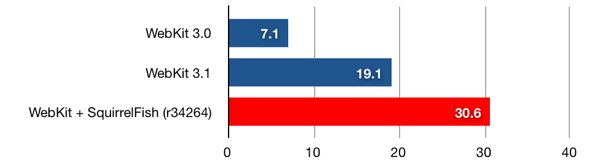
SquirrelFish is fast—much faster than WebKit’s previous interpreter. Check out the numbers. On the SunSpider JavaScript benchmark, SquirrelFish is 1.6 times faster than WebKit’s previous interpreter.

SunSpider runs per minute

bar graph of SunSpider runs

Longer bars are better.

What Is SquirrelFish?

SquirrelFish is a register-based, direct-threaded, high-level bytecode engine, with a sliding register window calling convention. It lazily generates bytecodes from a syntax tree, using a simple one-pass compiler with built-in copy propagation.

SquirrelFish owes a lot of its design to some of the latest research in the field of efficient virtual machines, including research done by Professor M. Anton Ertl, et al, Professor David Gregg, et al, and the developers of the Lua programming language.

Some great introductory reading on these topics includes:

I’ve also pored over stacks of terrible books and papers on these topics. I’ll spare you those.

Why It’s Fast

Like the interpreters for many scripting languages, WebKit’s previous JavaScript interpreter was a simple syntax tree walker. To execute a program, it would first parse the program into a tree of statements and expressions. For example, the expression “x + y” might parse to

        +
/ \
x y

Having created a syntax tree, the interpreter would recursively visit the nodes in the tree, performing their operations and propagating execution state. This execution model incurred a few types of run-time cost.

First, a syntax tree describes a program’s grammatical structure, not the operations needed to execute it. Therefore, during execution, the interpreter would repeatedly visit nodes that did no useful work. For example, for the block “{ x++; }”, the interpreter would first visit the block node “{…}”, which did nothing, and then visit its first child, the increment node “x++”, which incremented x.

Second, even nodes that did useful work were expensive to visit. Each visit required a virtual function call and return, which meant a couple of indirect memory reads to retrieve the function being called, and two indirect branches—one for the call, and one for the return. On modern hardware, “indirect” is a synonym for “slow”, since indirection tends to defeat caching and branch prediction.

Third, to propagate execution state between nodes, the interpreter had to pass around a bunch of data. For example, when processing a subtree involving a local variable, the interpreter would copy the variable’s value between all the nodes in the subtree. So, starting at the “x” part of the expression “f((x) + 1)”, a variable node “x” would return x to a parentheses node “(x)”, which would return x to a plus node “(x) + 1”. Then, the plus node would return (x) + 1 to an argument list node “((x) + 1)”, which would copy that value into an argument list object, which, in turn, it would pass to the function node for f. Sheesh!

In our first rounds of optimization, we squeezed out as much performance as we could without changing this underlying architecture. Doing so allowed us to regression test each optimization we wrote. It also set a very high bar for any replacement technology. Finally, having realized the full potential of the syntax tree architecture, we switched to bytecode.

SquirrelFish’s bytecode engine elegantly eliminates almost all of the overhead of a tree-walking interpreter. First, a bytecode stream exactly describes the operations needed to execute a program. Compiling to bytecode implicitly strips away irrelevant grammatical structure. Second, a bytecode dispatch is a single direct memory read, followed by a single indirect branch. Therefore, executing a bytecode instruction is much faster than visiting a syntax tree node. Third, with the syntax tree gone, the interpreter no longer needs to propagate execution state between syntax tree nodes.

The bytecode’s register representation and calling convention work together to produce other speedups, as well. For example, jumping to the first instruction in a JavaScript function, which used to require two C++ function calls, one of them virtual, now requires just a single bytecode dispatch. At the same time, the bytecode compiler, which knows how to strip away many forms of intermediate copying, can often arrange to pass arguments to a JavaScript function without any copying.

Just the Beginning

In a typical compiler, conversion to bytecode is just a means to an end, not an end in itself. The purpose of the conversion is to “lower” an abstract tree of grammatical constructs to a concrete vector of execution primitives, the latter form being more amenable to well-known optimization techniques.

Therefore, though we’re very happy with SquirrelFish’s current performance, we also believe that it’s just the beginning. Some of the compile-time optimizations we’re looking at, now that we have a bytecode representation, include:

  • constant folding
  • more aggressive copy propagation
  • type inference—both exact and speculative
  • specialization based on expression context—especially void and boolean context
  • peephole optimization
  • escape analysis

This is an interesting problem space. Since many scripts on the web are executed once and then thrown away, we need to invent versions of these optimizations that are simple and efficient. Moreover, since JavaScript is such a dynamic language, we also need to invent versions of these optimizations that are resilient in the context of an unknown environment.

We’re also looking at further optimizing the virtual machine, including:

  • constant pool instructions
  • superinstructions
  • instructions with implicit register operands
  • advanced dispatch techniques, like instruction duplication and context threading
  • getting computed goto working on Windows

Performance on Windows has extra room to grow because the interpreter on Windows is not direct-threaded yet. In place of computed goto, it uses a switch statement inside a loop.

Getting Involved

If you’re interested in compilers or virtual machines, this is a great project to join. We’re moving quickly, so the best way to come up to speed is to log on to our IRC channel.

As always, testing out nightly builds and reporting bugs is also a great help.

Extra Bonus Updates

We’ve got some extra bonus info: very early draft documentation of the SquirrelFish VM’s opcodes. For those of you who know about VMs, you may find this enlightening, for those who don’t, you may find it is simpler than you expect.

In addition, we have a detailed comparison of Safari 3.1 vs. SquirrelFish, looking at the individual tests, it is interesting to see which sped up the most. If you look at this comparison to Safari 3.0, you can see that we’ve sped up 4.34x overall since Safari 3, and have improved some kinds of code by over an order of magnitude.

SquirrelFish around the web: There’s lots of interesting discussion in the reddit article about this post. And posts from key SquirrelFish developer Cameron Zwarich has performance data and other info, as does occasional WebKit contributor Charles Ying.

via :webkit

Labels: ,


Tuesday, June 24, 2008

Webinar Recap: Ecommerce Innovations

t
This month’s webinar with Jason Billingsley covered various areas packed with examples from real online retailers. You can catch the full replay sometime tomorrow (we’ll let you know and post the link here) but for now you can flip through some of the examples, see the live sites and catch up on related blog posts you may have missed.

Next Webinar
3 Things to Die For: Web Analytics Unleashed with Avinash Kaushik
Thursday, July 17th @ 9am PST
Sign up to win one of 5 signed copies of Avinash’s book Web Analytics: An Hour a Day

Purpose of this Webinar

Innovations are not necessarily “sexy” — but they don’t have to be. This webinar is really to get you
thinking about the possibilities, whether you’re a small player or a multi-million dollar e-tailer. Innovation may exist in another segment / industry that can be applied to your business. And it doesn’t have to be a visual innovation - processes like customer service, fulfillment and order management can also have a profitable impact.

Video


Martin + Osa Shop-By-Outfit

  • Great to see items in context
  • Cross-selling entire outfits
  • Works for women who like to see how it looks “on”
  • Works for men who want to “get in and get out” and not waste time on browsing and outfit building
  • Helps the fashionably clueless
  • Blog post: Martin + Osa Launches Shop-By-Outfit + Video

Knicker Picker

  • See items “in context” (on humans)
  • Select size of model
  • See how sports product moves when the model jogs, show how supportive the item is - selling based on the function of a product

Gap.com Fit Finder

  • See what different cuts of pants look like on

Vitaman Global

  • Video-valet Nikki gives verbal affirmations when you add product to cart
  • Audible cross-selling, suggesting products that go with what you added to cart
  • Like a real physical store - kind of…
  • Blog post: Is Flattery a Viable Selling Strategy?

American Eagle

  • Now offline, but we blogged it: Video Valets: An Ecommerce Trend?
  • Net-lebrity iJustine tells girls and boys what’s cool for spring break, describing and “romancing” the products as you roll over them

Amazon.com Video Reviews

  • Very helpful for certain products
  • Problem: Used by viewers, but not contributed much by customers

TV.WineLibrary.com

  • Popular video podcast that doesn’t require big budget
  • Gary Vaynerchuk is a HUGE personality
  • Such helpful content, it’s very linkable, has active Facebook community, too
  • SEO smarts - each link to Gary’s video pages pass Page Rank to product pages, linked to from the video pages
  • Blog post: Anatomy of a Great Video Podcast

Customer Service

Coastal Contacts

  • Elastic Path customer, Coastal Contacts.com has a “Try Before You Buy” feature, you can order a few pairs and send back what you don’t want

Shoeline.com Return-O-Meter

Zappos

Why Zappos’ Customer Service is Innovative:

1. “The offer” get the right people on the bus
2. Prominent toll-free number
3. 24×7 call-center
4. Free shipping (both ways)
5. Free returns
6. Free (unexpected) upgraded shipping - shoes come faster than promised
7. No scripts, no call times
8. Find out of stock items at competing sites
9. Transparency - 350+ people on Twitter
10. CSRs have freedom to have person-to-person relationship. The famous example of Zaz Lamarr shares how a Zappos CSR sent flowers of sympathy on her own dime to a woman who lost her mom to cancer

Real World Guided Selling

Davids Bridal Dress Your Wedding

  • Interactive application to visualize your wedding photos - very appropriate for product

Oneida Virtual Table

  • Virtual table setting - choose table finish, dish and cutlery style

Crutchfield TV Fit Finder

  • Look up your TV to find compatible furniture, can work for any product that is sold for use with another product (car stereo, ink / toner etc)

MyDeco.com

  • Show physical arrangements of products, like Lionel Ritchie’s living room, or rooms that users have created
  • Choose your budget, and get product recommendations most appropriate for your budget
  • Slider narrows matches based on acceptable price range
  • Visual product recommendations powered by Imagini technology, click on images that stand out to you and see similar products based on your psychological profile

Land’s End

  • Has filtered navigation for bathing suits to narrow products by “Anxiety Zone,” - if you have short find suits that elongate the leg, etc.

Multi-Store Retailing

  • Coastal Contacts has multiple geographic domains (TLD like .com, .ca etc) which is great for international SEO
  • Avoid country-selector splash pages! Using IP redirect and forward to country specific site is better
  • Jason’s interview with Justin Skogen of DigitalElement on geographic IP sniffing
  • Netshops.com has hundreds of niche stores. SEO benefits: websites more apt to link to them, top level domain relevance
  • Jason’s interview with Roy Rubin of Magento about multi-store retailing

Gap.com

Steep and Cheap

  • Backcountry.com’s clearinghouse for deep discounted products, along with Chainlove.com sell one product per day until it’s sold out
  • Customer incentive to come back every day. If there’s nothing of interest, you can click through to clearance section
  • Creates a sense of urgency since product could sell out today

Shopatron.com

  • Shopatron is a service that eases the manufacturer - channel conflict, explained in Jason’s interview with Shopatron’s CEO Ed Stevens
  • Shopper makes a purchase, based on geographic location Shopatron assigns an order to nearest retail partner OR they can do in-store pickup

User Interface Design

AE.com

Action Envelope

  • Jason’s favorite site, here’s one reason why: mouseover a style and see deeper into site without clicking off the page
  • SEO benefit if implemented correctly

Endless.com

  • Hover over a product to view more colors - you’re missing out if you’re hiding colors!

  • Endless’ image zoom doesn’t cover price or add to cart buttons - great design

Borders.com

  • Borders’ “Magic shelf” shows book titles on a shelf that you can scroll left, right, up and down
  • Uses a degree of personalization if you sign in - just a different way to shop visually more akin to a real bookstore
  • Hover over items to see detail without leaving page you’re on

Abercrombie and Fitch

  • View details on “Complete the Look” cross-sells without leaving product page with AJAX hover

Navigation

  • OfficeMax’ alphabetical menu
  • Endless.com’s product carousel (scroll horizontally left and right)
  • Enldess.com’s price slider and color / size / width filters

Merchandising

  • Martin + Osa “layer your own look”

Social Shopping

Shoptogether by DecisionStep

Republic.co.uk

  • Using Polyvore, customers can build outfits, save the look and start sharing with the community

Vancouver 2010 Olympic Store


Shoes.com Customer Q&A

Customer Loyalty

  • Threadless uses a “crowdsourcing” business model, where customers suggest the products. You may not do this for every product but can think of which areas of your business to apply this to
  • Amazon’s Subscribe & Save program (blog post)
  • Amazon’s Gold Box Deals, products on sale for set amount of time until gone or time’s up. Subscribe to daily emails, add widget to your start page, by RSS, mobile via Twitter

Takeaways

1. Break it - Rethink old processes, like navigation, instead of following the leader. Test and try new things
2. Shoestring it - Don’t try to compete with multi-million site’s features (rich media etc) - think of Wine Library TV - the main cost is time. Or, leverage other 2.0 tools already made
3. Processes Count - You don’t need to modify visual things, you can do customer service innovations like Zappos, innovative policies or value propositions
4. Look to the real world - Helicopter seeds inspired the real helicopter. Think of how to replicate real-store experiences
5. Prove it, sell it - If you need to prove it to your bosses, just get your hands dirty in an innovation on your own (like a side project), then you can show some results which can be rolled out on the main site.

Question Period Notes

(These are notes, not a transcript)

About rich user interfaces - does single screen checkout make sense?

Jason talked to a retailer (Intuit?) that tested 95% regular vs. 5% one-page and found single didn’t convert as well. Intuit hasn’t moved fully to single screen but continues to test the process. Action Envelope is a good example of a one-page checkout.

Allurent and Liquid Pixels are service providers for RIA (rich interface applications), check out Jason’s Internet Retailer interviews with Allurent and Liquid Pixels.

Bernadine Wu from Fit For Commerce believes some innovations actually take a step back. You don’t need to use the newest trends you may be to use dynamic style sheet, which could have bigger impact on conversions than crazy, dynamic recommendation engines, for example.

Do RIA’s improve conversions? Testing tools for rich interfaces?

You could take traffic and filter through router to split test
Omniture Offermatica may have something relevant
A/B split test with Google Website Optimizer
Avinash Kaushik has a podcast on measuring rich media

Attendee comment: Woot is a Steep-and-Cheap style site which uses humor, not blah boring copy. Good point that people want to engage with people.

Innovative B2B sites?

Office Max navigation - whether that’s effective innovation, not sure.
B2B and B2C not that different these days, B2B may want to leverage preferred contracts or supplier lists or improve processes like order management.

Color innovation - do colors have impact?

It has a lot to do with brand, if you’re a multi-channel retailer you want some consistency. Testing is recommended. One thing to keep in mind, don’t make call to action button the same color as everything else.

International companies, how do you know when to stop or go?

Things that work in Asia/Europe might not work in North America, and vice-versa. Without geographical market knowledge, you’re taking a risk. Coastal Contacts uses richer color pallettes for Asian stores than US/Canada (oranges vs. blues). Also, countries used to higher broadband speeds may expect your site to work much faster than other countries tolerate - so don’t add something that will slow down your site just to be innovative.

via: getelastic.com

Labels: , ,


Thursday, June 12, 2008

If your Users Fail, your Website Fails

On the web, in the age of Google, design has no margin of error, and there are no stupid users, only inadequate designs. Those were the main points of my critique of newspaper websites generally, and WashingtonPost.com (WPO) in particular, which to be fair, apply to all online publishers, and really any website. I’m writing another post on this same topic because the issue is so fundamental to the future of media, news, publishing, and journalism, that it really can’t be over-emphasized or over-clarified.

In print, a design flaw is unlikely to cause a reader to abandon a newspaper or magazine entirely — they are a largely captive audience. But it will cause them to abandon a website. Google understands this better than any web company, which is why it is the most successful. Google is obsessed with making sure its users never fail, no matter how “stupid” they are. Google makes users feel smart. That’s why they keep coming back.

Invariably, when I write about a negative experience with a website, e.g. Twitter or WashingtonPost.com, someone puts forth what I call the “stupid user” argument — essentially, I failed because I’m a stupid user. And if I were a better user, I would have been more successful with the site. For example, I discovered that WashingtonPost.com has a local version of its homepage, which it displays to logged in users. Creating different versions of a site for different users is web-savvy. If I had been logged in, I would have found the content I was looking for on the homepage. That’s all good, and much to their credit.

Unfortunately, I never log in to WashingtonPost.com, although I read it frequently. Therefore, the “stupid user” argument goes, the failure to find the content I wanted was my fault. Here’s the problem — my failure to find the information I wanted is not MY problem, because I went to Google and found it. I succeeded. The failure is the site’s problem, because I abandoned it and went instead to a site that would help me succeed without having to be smarter.

WashingtonPost.com and, to be fair, most other sites that require registration assume that users will register to help the site achieve its goals, whether customizing content or targeting advertising.

But users don’t care about the site’s goals. They care about THEIR OWN goals.

Labels: , ,


Wednesday, June 4, 2008

Improve Your Page Performance With Lazy Loading

Not too long ago, JavaScript made it possible to add nice effects to a page. And with the emergence of libraries, robust applications are emerging built on top of Prototype, Dojo, YUI, and other toolkits. Unfortunately, the people that pay the price for these so-called ‘thin clients’ are the end users. Every JavaScript file that needs to be loaded is a new connection to the server, and every connection to the server means more data; all this occurs before the end user even gets to interact with the page. Thankfully, there is a better way to do this—loading pieces of your web application as the user wants them.

"As an alternative to XHR-style includes of JavaScript files, some libraries such as YUI offer the creation of dynamic script nodes for including files. What these tools gain in cross-domain functionality and multiple asynchronous connections, they lose in ease of use. Additionally, since the call doesn’t wait to complete, some form of validation is needed before running our callback."

The important things to address are page weight and load time. Both of these factors have a negative impact on the user, and we should be working towards minimizing it. Gaia Online and Zimbra have both talked recently about their lazy loading experiences. When the switch to lazy loading was made, both companies reduced their page weight by about 200KB and took at least two seconds off their load and initialization time.

Of course, lazy loading isn’t necessarily for everyone. If all of your site pages need all of your JavaScript before the page completes loading, then a lazy load won’t accomplish much. But if you’re working on a complex site or Web 2.0 application, read on!

Lazy Loading, Theory and Terminology

In conventional computer science, the lazy load pattern is a practical implementation of the Proxy Design Pattern. The goal is to avoid loading an object until it is absolutely needed—only then do we invest the resources in loading it. In the case of JavaScript, our application has a common set of function calls used by the web page. Our goal is to implement all of those functions with none of the “real” code. We’ll retrieve the real code later, when we need it. To a developer using our object, though, we want something that will look, act, and behave just like the original object. This specific implementation of the Proxy Design Pattern is called a Ghost.

In the Ghost pattern, we will provide an object that contains all of the public methods of our original object, but they will just be empty stubs with calls to our lazy load operation. When the object is actually used, we’ll load the real object, replacing our shell with the real one. We can then call the same method again, referencing the object we just loaded. Subsequent calls will hit the real object, as the shell no longer exists.

For this article, I’ll be using what is probably the most over-complicated Hello World object in the, um, world:

var HelloWorld = {
sayIt: function() {
alert('Hello, I came from script loaded on the fly!');
}
};

Our application has one public method—sayIt()—which provides an alert to the screen.

Our Very Simple Application

Switching to a Shell Object

To switch to a shell object we are going to need to add a few things to our HelloWorld object. The new method and property are unique to the lazy load process, and allow other components to know when something has finished loading—they are the is_loaded property and lazyLoad() method. We add these to our HelloWorld application:

var HelloWorld = {
is_loaded: false,
lazyLoad: function(callback) {
// placeholder
},
sayIt: function() {
var args = arguments;
HelloWorld.lazyLoad(function() { HelloWorld.sayIt.apply(HelloWorld, args); });
}
};

In the above example, we’ve also replaced the sayIt() method with our call to the lazyLoad() method. Before going further, let’s look at what exactly sayIt() is doing.

The first line of sayIt() stores the function’s arguments in the variable args, while the second line calls our lazyLoad() method. The only parameter passed into lazyLoad() is an anonymous function. The body of the function contains an apply statement. When run, the method sayIt() gets called during the callback, using whatever the current HelloWorld object is, thus preventing us from leaving the old HelloWorld.sayIt() bound to the callback. This would also need to be done for onclick events, etc. It ensures that you call sayIt() on whatever HelloWorld object is currently loaded.

Retrieval of the Real Object

The next step is to write the lazyLoad() method in our object. There are two main ways of loading scripts into our page: XMLHttpRequest (XHR) and dynamic script tag nodes in the DOM. If you are using a library, chances are there is already a load utility built in. For our examples, we’ll be showing how lazy loading is done in both the Dojo Toolkit and the YUI Library. For frameworks that don’t include a loading utility, I’ll also provide examples using a standalone class called JIT.

Lazy Loading With XHR and Dojo

The Dojo toolkit provides a directive for including Dojo package files, called dojo.require(). The loader for Dojo prevents modules from being loaded twice, and ensures code execution stops during the inclusion process, because Dojo uses a synchronous request to grab the JavaScript file and then evaluates it into the window scope. This is, bar-none, one of the cleanest ways to perform a lazy load, as you are not worrying about callbacks, cleaning up script nodes, or anything of the sort. Of course the XMLHttpRequest won’t work cross-domain, so if your web page is on www.example.com and your scripts live at js.example.com, you will run into problems.

To execute a lazy load in Dojo, we simply make a dojo.require() call, followed by the callback if it exists. We’re freed from any sort of testing if the module exists thanks to the way the synchronous XHR works.

var HelloWorld = {
is_loaded: false,
lazyLoad: function(callback) {
dojo.require('dojo_ex.helloworld');
if (callback) {
callback();
}
},
sayIt: function() {
var args = arguments;
HelloWorld.lazyLoad(function() { HelloWorld.sayIt.apply(HelloWorld, args); });
}
};

Dojo Lazy Loading In Action

Lazy Loading With Dynamic Script Nodes in YUI and JIT

As an alternative to XHR-style includes of JavaScript files, some libraries such as YUI offer the creation of dynamic script nodes for including files. What these tools gain in cross-domain functionality and multiple asynchronous connections, they lose in ease of use. Additionally, since the call doesn’t wait to complete, some form of validation is needed before running our callback.

YUI’s Loader Utility has a few things it needs in order to work properly. We need to add the module’s information to the loader; tell the loader we require it; and then assign the callback to the loader’s onSuccess handler. In YUI, calling loader.insert() starts the loader, creating script nodes for all required modules and then calling the onSuccess callback when those nodes have completed:

var HelloWorld = {
is_loaded: false,
lazyLoad: function(callback) {
var loader = new YAHOO.util.YUILoader();
loader.addModule({
name: "helloworld",
type: "js",
fullpath: "yui_ex/helloworld.js"
});
loader.require("helloworld");
if (callback) {
loader.onSuccess = callback;
}
loader.insert();
},
sayIt: function() {
var args = arguments;
HelloWorld.lazyLoad(function() { HelloWorld.sayIt.apply(HelloWorld, args); });
}
};

YUI Lazy Load In Action

Similar to YUI’s Loader, the JIT Loader also uses dynamic script nodes but instead of managing packages, it instead manages loaded script URLs. The only other major difference is the addition of a verifier function, which tests our object to ensure it has finished loading before performing the callback. In our case, we’ll look at the HelloWorld.is_loaded property (bet you were wondering what that was for!) and wait until it changes to true, indicating our real object has been lazy loaded:

var HelloWorld = {
isLoaded: false,
lazyLoad: function(callback) {
JIT.loadOnce('jit_ex/helloworld.js',
function() {
return HelloWorld.is_loaded;
},
callback
);
},
sayIt: function() {
var args = arguments;
HelloWorld.lazyLoad(function() { HelloWorld.sayIt.apply(HelloWorld, args); });
}
};

JIT Lazy Load In Action

Triggering a Lazy Load

In all of the above examples, we already did the heavy lifting on the event binding, but didn’t really touch on it. Much in the same way we wrote our sayIt() method to unbind the callback using an anonymous function, we will want to be doing the same for our DOM Events. To illustrate, these are the DOM events for each library tool we’ve talked about so far.

// Dojo
dojo.connect(dojo.byId('clickme'), 'onclick', function() {
HelloWorld.sayIt.apply(HelloWorld, arguments);
});

// YUI
YAHOO.util.Event.addListener("clickme", "click", function() {
HelloWorld.sayIt.apply(HelloWorld, arguments);
});

// JIT
addListener(document.getElementById("clickme"), "click", function() {
HelloWorld.sayIt.apply(HelloWorld, arguments);
});

In each case, instead of just passing in the HelloWorld.sayIt() reference, we instead pass in an anonymous function, which ensures HelloWorld.SayIt() is called in the proper scope (whatever HelloWorld is defined as in that moment). As an added touch, we also pass through the arguments, so that libraries which have event handling can get all the required mouse objects. There is no reason we should be restricting our code to load only when the user clicks, however. With a large application, we can also use proximity-based loading and deferred loading techniques, all without modifying the shell that we already built. All we need to do is call HelloWorld.lazyLoad() to kick off the loading.

Proximity-based loading

Proximity-based loading is the idea that as soon as you the developer believe the user will use a component, you initiate the loading process.


In the above code, we can attach a mouseover event to foo_launcher, since the only reason the user might be moving over that container is to click the foo button.

Deferred loading

Deferred loading, on the other hand, only puts off loading until all the important stuff has finished loading. Several libraries offer the equivalent of an onDomReady call, which would be a good time to add the additional JavaScript files. While this can provide the benefit of everything being loaded ahead of time, if the user performs an action that requires module C, and you were in the middle of loading module A, there will be a slight delay until module A has been fully loaded.

To help illustrate these different techniques, here is a set of pages that highlights all the different lazy load entry points across all three utilities.

Example in Dojo
Example in YUI
Example in JIT

Caveats and Cautions

It’s hard to create perfect code, and every implementation has its drawbacks. In the case of the Ghost pattern, without JavaScript’s support for interfaces, maintainability becomes a bit trickier, as every public method that is in the real object must be stubbed out in the shell object. For most objects, this probably won’t be a problem, but for more complex objects, using an interface pattern will help lower the maintainability cost.

Because of the way objects are loaded (in every case except same-domain Dojo), there is no way to actually use return values from public methods and you will instead need to rely on callbacks. The following code would be impossible to support via a lazy load:

{
sayIt: function(name) {
return "My name is "+name;
}
}

To help avoid this, lazy loading is best suited for event-driven calls, or moved to an external object manager (via the factory pattern).

The final caveat comes back to the funky fn.apply() syntax we’ve been using inside our anonymous functions. If you just bind HelloWorld.sayIt() directly in our examples, you’ll discover that while things work well in Firefox, IE actually holds onto a reference of the shell version of the HelloWorld.sayIt() object. Even though the real object is loaded, IE will continue to call the HelloWorld that existed while the binding was made. The apply() method lets us also pass our arguments around, improving the transparency of the lazyLoad call.

Labels: ,


Tuesday, June 3, 2008

Google Launches Hosted Site Search; Not Ditching Mini After All

A couple weeks ago we reported a rumor that Google was going to replace its Mini search appliance with a new hosted solution for indexing content found behind the firewall and on corporate websites.

Turns out the rumor was just half correct. Google is not ditching the Mini but it is launching a new service called Google Site Search, which is basically a rebranding and enhancement of the existing Google Custom Search Business Edition.

Google Site Search is intended for organizations that want to add Google search functionality to their websites. It has three main improvements over the former custom search offering: it allows for synonym matching, results tweaking, and indexing of so-called “dark web” content.

If you a run a site that often refers to terms by their acronyms, or commonly uses different phrases to describe things, you can upload a list of synonyms to Google and it will treat them the same when a user searches within your site.

If you’re a news site (like TechCrunch) that tends to place a premium on newer content, you can bias content based on its date, forcing the newest results to the top. Similarly, if you’re an online retailer or provider of some other type of content, you can give preference to results for that content (in the online retailer’s case, any product pages where visitors might go on to buy things).

Google Site Search mainly relies on the standard Google crawler when scouring your site. But you can also hand it special sitemaps so that it recognizes areas of your website that might typically be overlooked by the crawler. These are results like those hidden behind forms or available only through intricate database queries.

Perhaps most compellingly, Google Site Search can be visually customized to match the look and feel of your website. This isn’t a new feature (it existed in the previous business edition) but something perhaps overlooked by most site owners. When you implement site search, you can customize the appearance with a WYSIWYG editor, or even request a raw XML file that can be parsed and displayed anyway you want (you don’t even have to include Google branding on your results pages).

On the other side of the firewall, the Mini is “alive and well” and has even received a recent set of upgrades. Google says that it expects organizations to increasingly use the Mini for only behind-the-firewall type queries (those that retrieve data not available publicly). With the new Google Site Search, there’s no real reason for people to use the Mini to index public websites anymore.

When asked whether Google might eventually provide a hosted solution for indexing private corporate data, company representatives say it’s not ready to announce anything but they “would hope we get to that point” eventually. While Google Docs and other online collaboration tools show that enterprises are gradually willing to put their data in the cloud, perhaps the market isn’t quite ready to hand over the whole basket.

Labels: ,


Monday, June 2, 2008

The Future of Usability Testing

By Peter Abrahams, Bloor Research


I recently chaired a round table on the Future of Usability Testing. It was sponsored by Techsmith who supply the usability testing tool, Morae. The invited attendees included developers, usability experts, an internet psychologist, and journalists all with considerably understanding and strong opinions about usability. I came with a strong interest in accessibility, which to a great extent can be seen as a subset of the usability requirements. The aim of the roundtable was to better understand how to make usability design and testing business as usual in IT systems. This big question was approached by looking at several more specific questions:

1. Why is usability important?
2. What are the barriers to usability design and testing?
3. How should it be imbedded into all phases of development?

IMPORTANCE
Usability is important because:

- It drives down production costs. There should be fewer calls to the help desk for assistance in using the system. Customers will complete more transactions without having to turn to call centre staff to process the transaction for them. Internal users will complete tasks faster and more accurately, so increasing their efficiency.

- It improves sales. If a system is easy to use a customer is more likely to complete a transaction, so increasing conversion rates. If it is too hard the user will turn to another supplier, with the short-term loss of this sale and the probability of the long-term loss of future sales.
- It enhances brand loyalty. If a system is easy to use then the client should be delighted by the experience. This will add to their positive feelings about the quality of the brand. This is becoming more important as users are being exposed to best-of-breed systems which shows what is possible.
- In the public sector it provides access for all. Government bodies have an obligation to provide services to all members of the community; this should be true of the private sector as well but in reality they can decide not to service some groups. A system that is usable and accessible will reach a very large percentage of the population.

BARRIERS
Usability design and testing is not imbedded into the development cycle because:

- The benefits of good usability are not recognised by commissioners of the system. Advocates of usability in IT systems have not been sufficiently vocal. It is assumed that systems will be usable by default. This is in contrast to the effort that is put into the usability of the physical environment such as shop layouts or car design.

- The concepts of usability are not understood by the IT industry. Usability has not been a key part of IT education. IT developers are experts in IT and the technology and do not understand the difficulty many users have.

- The cost and benefits are not visible until a system is in production. When problems are discovered the best solutions may not be obvious and the cost of remedial action may be considered too high, so the system remains less usable than it should be.

- Extra design and testing seen are as a cost. Development is driven by budgets and deadlines; if usability is not included explicitly in the requirements then any usability improvements that could lead to overruns will be shelved until a version 2 fix cycle.

Labels: ,


Design Decisions vs. Audience Considerations

Deep down below the layers of interface, CSS, HTML, and XML—down where only the geekiest among us roam—everything comes down to this: it’s all zeroes and ones. On or off. The digital switch.

Though interaction and conversion becomes a bit more complicated at the point the interface meets the visitor, though there are a few more shades of gray, in the end it comes down to the same thing: yes or no. You will succeed in attracting and engaging your audience… or you won’t. Your audience will visit your site looking for information they want to find or a product they are interested in. If they don’t find it, or if you don’t otherwise engage them, they’ll leave.

We know this, and yet the attraction of designing for ourselves, because we know best, or simply giving the client what he or she wants, after all they are paying, tempt us regularly. As web designers, we have a unique and thorny task. How do we present the information we most want a visitor to see while simultaneously serving the visitor the content they came for? The two may not be the same, so an awareness of who our audience is as well as why our audience is there should be considered before a single design decision is made.

If you know who your target audience is, you can tailor your site’s look and feel, content, and action areas to appeal to your audience and draw them in. If you know what your site visitors want, you can use that information to mutual benefit. Site visitors will leave having found what they came for, and—if you have done your homework—you will have gotten the response you wanted from them. This may be their contact information. It may be a product purchase. If you are really lucky, the site visitor will sign up to receive email and you will have a chance to forge an ongoing relationship.

We all know that site visitors prefer a site that is easier to use. An optimized site will have more traffic. A site that is cross-browser compatible will carry the same message and branding to everyone who looks at it, without unpleasant and unexpected behavior. Usability, Standards and Content Optimization are, at the end of the day, also audience considerations.

Labels: ,