Monday, September 22, 2008

10 Smart Javascript Techniques to Improve Your UI

Javascript can add a lot of special effects that can really improve the user's experience. Here are 10 simple and clever Javascript techniques that add an extra dose of usability to any webpage.

Javascript is typically used as an aesthetic language in web development. This means that web developers should almost always be using Javascript for one thing only: Improving the visitor's experience. There are many clever and useful ways to improve a site from the user interface perspective. A developer can find nearly any snippet of Javascript to achieve what he or she wants to accomplish.

Javascript is truly a powerful and easy language to learn. It can be used to perform simple, aesthetic functions like toggling an element. It can be used to power a dynamic email client, and even send data instantaneously. Javascript can be as simple or advanced as you want it to be.

Javascript Frameworks

A great place to find Javascript techniques that can improve your site's functionality is by browsing Javascript frameworks and their plugins and documentation. Here are a few frameworks that have lots of resources, plugins, and communities behind them:

Frameworks are a blessing to any developer or designer who wants to quickly add Javascript effects to their layouts, without having to make raw code. Many of the techniques that we use below will run on Javascript frameworks like JQuery or MooTools.

Simple Javascript Techniques that Make Happy Users

It's important to note that many of these features aren't big and obnoxious, but rather small and subtle. Too often developers get carried away when it comes to adding Javascript. These are small but very useful techniques that can be used by almost any developer. You'll also note that most of these features deal with cleverly hiding and showing important information in non-traditional ways.

1. jQuery Hover Sub Tag Cloud

The jQuery hover sub tag cloud is an excellent example of a simple piece of Javascript that really adds a nice, subtle touch to tag clouds. As the user hovers over a specific tag and it has sub-tags associated with it, a pop-up box appears and shows the sub-tags. Simple, yet effective.

2. Opacity Change

Opacity Change is a little tutorial on how to use Scriptaculous to make an opacity change for an element.

Opacity changes are great for many different reasons: showing hovered content, showing content that has been clicked on, and many other useful functions.

3. Image Upload and Auto Crop

Being able to crop photos after you upload them is a feature that more web applications could use. That's why the jQuery image upload and crop is such an under-used Javascript technique. Cropping images is a much-needed function when it comes to uploading images, and many web applications could benefit from adding this useful feature.

Honestly, I think that nearly all image uploads could use a basic crop function. However, image cropping isn't the easiest Javascript function to add to a form. It's a somewhat involved process, using image libraries and Javascript. Using this script built on the jQuery framework can add a lot to the user's experience without a bunch of extra code.

4. Password Strength Meter

As hackers become smarter and larger in numbers, it's becoming more and more important for site users to pick strong, non-guessable passwords that contain a combination of letters (upper and lower case), numbers and special characters. However, this task is easier said than done. Users typically don't read directions if they can help it.

Visually showing password strength in registration forms is an excellent way to encourage users to make the passwords more challenging. While this is slowly becoming more common this simple technique is not used anywhere near as much as it should be.

The Password Strength Meter works off of prototype/scriptaculous and is a handy little script that shows the strength of the password with a colored meter in real-time. More sites need to implement this type of "safety" script to help users see the dangers of inputting weak passwords.

5. Magic Zoom

Magic Zoom is a highly-useful script for eCommerce sites, as well as other sites that have detailed images. Instead of having the user making an extra click to a much larger picture and use up bandwidth, Magic Zoom allows you to essentially look through a magnifying glass at each picture.

Magic Zoom is a paid script, but well worth the $47 if you have an eCommerce store or any other site that has very detailed photographs. You can download the trial version below.

6. JQuery Autotab

Every single form on the Internet should have this feature. It might just be the perfectionist in me, but having multiple input forms that autotab to the next input automatically seems like it should be commonplace. It's such a relief when filling out items like social security numbers when the input automatically tabs to the next input.

The jQuery Autotab script is self-explanatory, and does what the name implies: adds autotabs to forms with jQuery.

Sometimes it's the small things in development that can really make a difference.

7. Incredible Javascript Login Form

While we typically don't like to toot our own horn at NETTUTS, how can we talk about clever and useful Javascripts without bringing up Connor Zwick's awesome tutorial on how to build a useful login form?

The Javascript login form is an elegant combination of jQuery and a beautiful Photoshop layout to achieve the effect of being able to show a login form without having the box take up a bulk of the page. Digg is another great example of a site using Javascript to show and hide the login form.

8. Context Highlighting Web Forms

Forms are some of the hardest parts of web design. Make a form too long and you might scare away a potential user or customer. If a form's design is unattractive, that might scare away a potential user as well. Any way that we can make our web forms more appealing to the eye will yield a higher sign-up conversion rate.

The context highlighting web forms script is an excellent attribute to add to a signup form. It's surprising that more forms don't offer this functionality. Being able to quickly see the progress on a form can noticeably improve the user experience.

9. Sliding Top Panel

The Sliding Top Panel script is a lot like the Incredible Javascript Login Form. Hiding/Showing important information is a key to beautiful, usable designs. Any time we can use Javascript to help keep unneeded information neatly packed away, we should be striving to do that.

10. Social History

Site promotion buttons and links can quickly clutter a site or blog's layout. It seems that if you want to promote your blog posts and other content on sites like Digg and Delicious, you have to add a long list of buttons to your template so that you don't exclude anyone's favorite social bookmarking or news site.

Social History comes in handy because it runs a test to see where the user has been recently, and loads images to those sites, and only those sites. Essentially, it's only showing the visitor the buttons that they would want to see.

via :nettuts.com

Labels: ,


Tuesday, July 1, 2008

Announcing SquirrelFish

SquirrelFish Mascot

“Hello, Internet!”

WebKit’s core JavaScript engine just got a new interpreter, code-named SquirrelFish.

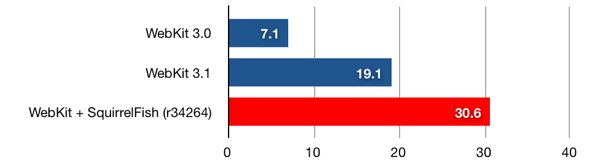
SquirrelFish is fast—much faster than WebKit’s previous interpreter. Check out the numbers. On the SunSpider JavaScript benchmark, SquirrelFish is 1.6 times faster than WebKit’s previous interpreter.

SunSpider runs per minute

bar graph of SunSpider runs

Longer bars are better.

What Is SquirrelFish?

SquirrelFish is a register-based, direct-threaded, high-level bytecode engine, with a sliding register window calling convention. It lazily generates bytecodes from a syntax tree, using a simple one-pass compiler with built-in copy propagation.

SquirrelFish owes a lot of its design to some of the latest research in the field of efficient virtual machines, including research done by Professor M. Anton Ertl, et al, Professor David Gregg, et al, and the developers of the Lua programming language.

Some great introductory reading on these topics includes:

I’ve also pored over stacks of terrible books and papers on these topics. I’ll spare you those.

Why It’s Fast

Like the interpreters for many scripting languages, WebKit’s previous JavaScript interpreter was a simple syntax tree walker. To execute a program, it would first parse the program into a tree of statements and expressions. For example, the expression “x + y” might parse to

        +
/ \
x y

Having created a syntax tree, the interpreter would recursively visit the nodes in the tree, performing their operations and propagating execution state. This execution model incurred a few types of run-time cost.

First, a syntax tree describes a program’s grammatical structure, not the operations needed to execute it. Therefore, during execution, the interpreter would repeatedly visit nodes that did no useful work. For example, for the block “{ x++; }”, the interpreter would first visit the block node “{…}”, which did nothing, and then visit its first child, the increment node “x++”, which incremented x.

Second, even nodes that did useful work were expensive to visit. Each visit required a virtual function call and return, which meant a couple of indirect memory reads to retrieve the function being called, and two indirect branches—one for the call, and one for the return. On modern hardware, “indirect” is a synonym for “slow”, since indirection tends to defeat caching and branch prediction.

Third, to propagate execution state between nodes, the interpreter had to pass around a bunch of data. For example, when processing a subtree involving a local variable, the interpreter would copy the variable’s value between all the nodes in the subtree. So, starting at the “x” part of the expression “f((x) + 1)”, a variable node “x” would return x to a parentheses node “(x)”, which would return x to a plus node “(x) + 1”. Then, the plus node would return (x) + 1 to an argument list node “((x) + 1)”, which would copy that value into an argument list object, which, in turn, it would pass to the function node for f. Sheesh!

In our first rounds of optimization, we squeezed out as much performance as we could without changing this underlying architecture. Doing so allowed us to regression test each optimization we wrote. It also set a very high bar for any replacement technology. Finally, having realized the full potential of the syntax tree architecture, we switched to bytecode.

SquirrelFish’s bytecode engine elegantly eliminates almost all of the overhead of a tree-walking interpreter. First, a bytecode stream exactly describes the operations needed to execute a program. Compiling to bytecode implicitly strips away irrelevant grammatical structure. Second, a bytecode dispatch is a single direct memory read, followed by a single indirect branch. Therefore, executing a bytecode instruction is much faster than visiting a syntax tree node. Third, with the syntax tree gone, the interpreter no longer needs to propagate execution state between syntax tree nodes.

The bytecode’s register representation and calling convention work together to produce other speedups, as well. For example, jumping to the first instruction in a JavaScript function, which used to require two C++ function calls, one of them virtual, now requires just a single bytecode dispatch. At the same time, the bytecode compiler, which knows how to strip away many forms of intermediate copying, can often arrange to pass arguments to a JavaScript function without any copying.

Just the Beginning

In a typical compiler, conversion to bytecode is just a means to an end, not an end in itself. The purpose of the conversion is to “lower” an abstract tree of grammatical constructs to a concrete vector of execution primitives, the latter form being more amenable to well-known optimization techniques.

Therefore, though we’re very happy with SquirrelFish’s current performance, we also believe that it’s just the beginning. Some of the compile-time optimizations we’re looking at, now that we have a bytecode representation, include:

  • constant folding
  • more aggressive copy propagation
  • type inference—both exact and speculative
  • specialization based on expression context—especially void and boolean context
  • peephole optimization
  • escape analysis

This is an interesting problem space. Since many scripts on the web are executed once and then thrown away, we need to invent versions of these optimizations that are simple and efficient. Moreover, since JavaScript is such a dynamic language, we also need to invent versions of these optimizations that are resilient in the context of an unknown environment.

We’re also looking at further optimizing the virtual machine, including:

  • constant pool instructions
  • superinstructions
  • instructions with implicit register operands
  • advanced dispatch techniques, like instruction duplication and context threading
  • getting computed goto working on Windows

Performance on Windows has extra room to grow because the interpreter on Windows is not direct-threaded yet. In place of computed goto, it uses a switch statement inside a loop.

Getting Involved

If you’re interested in compilers or virtual machines, this is a great project to join. We’re moving quickly, so the best way to come up to speed is to log on to our IRC channel.

As always, testing out nightly builds and reporting bugs is also a great help.

Extra Bonus Updates

We’ve got some extra bonus info: very early draft documentation of the SquirrelFish VM’s opcodes. For those of you who know about VMs, you may find this enlightening, for those who don’t, you may find it is simpler than you expect.

In addition, we have a detailed comparison of Safari 3.1 vs. SquirrelFish, looking at the individual tests, it is interesting to see which sped up the most. If you look at this comparison to Safari 3.0, you can see that we’ve sped up 4.34x overall since Safari 3, and have improved some kinds of code by over an order of magnitude.

SquirrelFish around the web: There’s lots of interesting discussion in the reddit article about this post. And posts from key SquirrelFish developer Cameron Zwarich has performance data and other info, as does occasional WebKit contributor Charles Ying.

via :webkit

Labels: ,